Series Navigation
7 PartsComplete Event-Driven Architecture & Apache Kafka Blog Series
Series Overview
Introduction to Event-Driven Architecture - Building Your First Kafka Example
A Beginner's Guide
Designing Events - The Heart of Event-Driven Architecture
Poor event design leads to tight coupling, versioning nightmares, and systems that are hard to evolve.
Introduction to Apache Kafka - The Event Streaming Platform
This is where traditional message queues fall short, and where Apache Kafka excels.
Hands-On Kafka - Building Your First Event-Driven Application
In this part, we'll build a complete event-driven e-commerce system using Kafka.
Advanced Kafka Concepts - Mastering Production Kafka
Let's dive deep into advanced concepts that separate hobby projects from production systems.
Advanced Event-Driven Patterns - CQRS, Event Sourcing, and Sagas
Let's explore advanced architectural patterns that leverage events to build sophisticated, scalable applications.
Operating Event-Driven Systems in Production
Now comes the hard part: running it reliably in production
Part 3: Introduction to Apache Kafka - The Event Streaming Platform
From Data Chaos to a Central Nervous System for Your Enterprise
"A modern company isn't just one piece of software with one database. The problem we face is how to connect all this up... This problem isn't about managing data at rest—it is about managing data in motion."
— Jay Kreps, Cofounder and CEO at Confluent
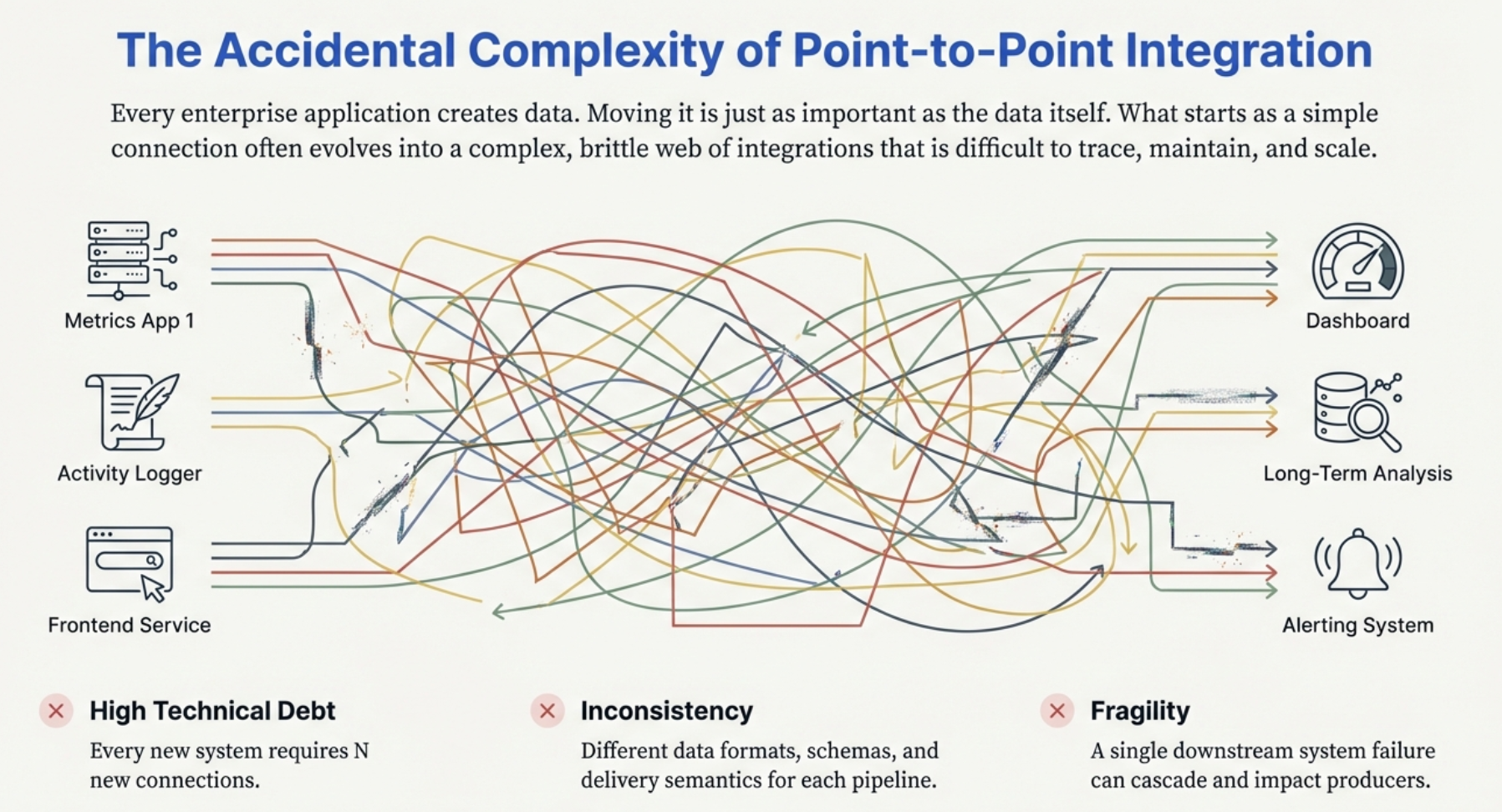 The spaghetti diagram: Multiple apps (Metrics App, Activity Logger, Frontend Service) all connected to multiple destinations (Dashboard, Long-Term Analysis, Alerting System) via a tangled web of point-to-point connections.
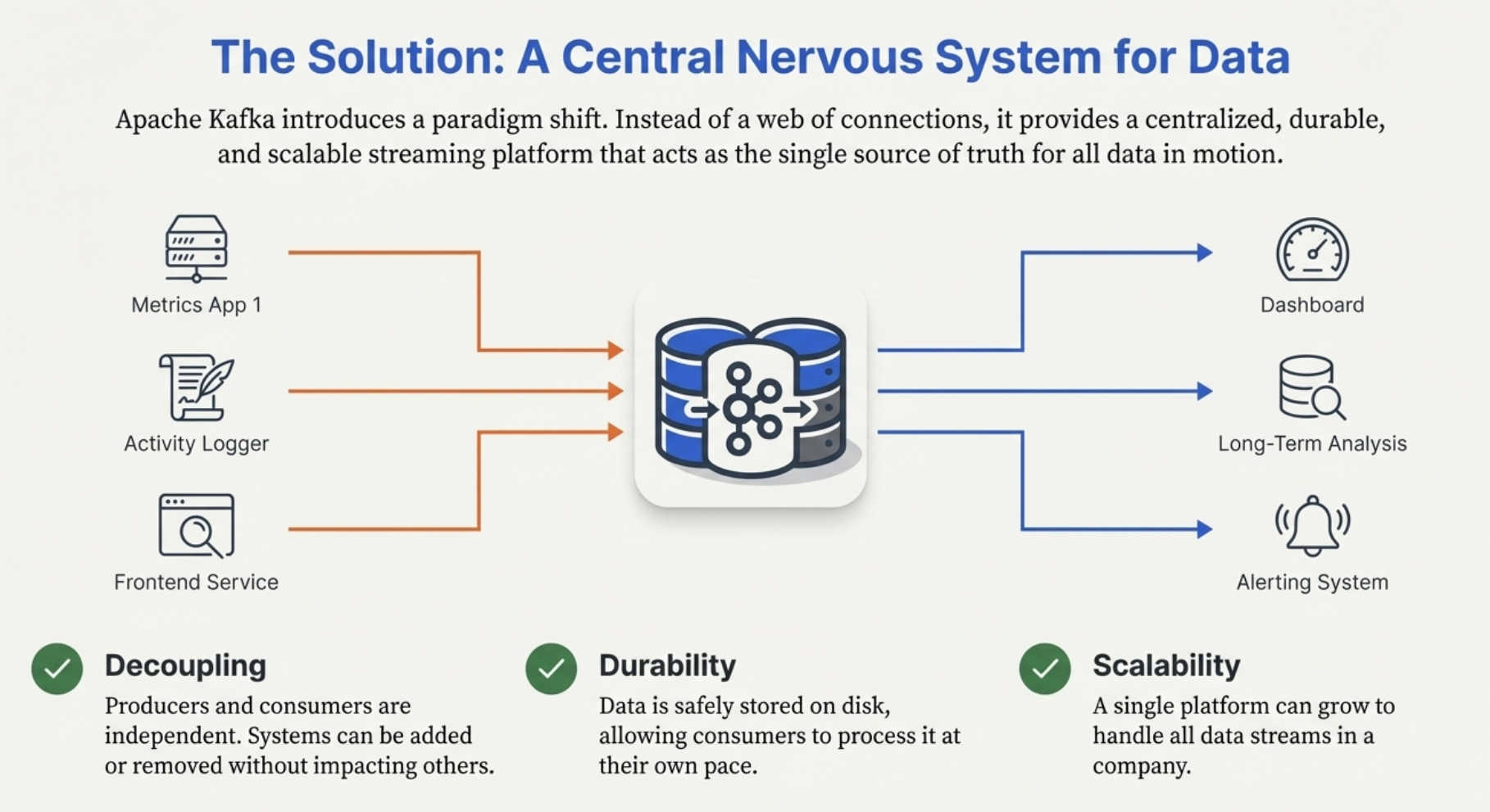 Clean architecture: All producers (Metrics App, Activity Logger, Frontend Service) send data to a central Kafka cluster, and all consumers (Dashboard, Long-Term Analysis, Alerting System) read from it independently.
📸 Image Source Note: All images in this post are taken from some of my earlier presentations on Kafka and Event-Driven Architecture. They’ll be updated over time, as Kafka continues to evolve and new features are introduced, to ensure everything stays accurate with the current ecosystem.
The Event Streaming Challenge
You've designed beautiful events in Part 2. Your services are ready to produce and consume them. Now you need infrastructure that can handle:
- ✅ Millions of events per second
- ✅ Multiple consumers for the same event
- ✅ Event replay (reprocess old events)
- ✅ Durability (don't lose events)
- ✅ Ordering guarantees
- ✅ Horizontal scaling
- ✅ Fault tolerance
This is where traditional message queues fall short, and where Apache Kafka excels.
graph TB
    subgraph "Traditional Message Queue"
        A1[Producer] --> B1[Queue]
        B1 -->|Consumed| C1[Consumer 1]
        B1 -.->|Deleted| X1[❌ Message Gone]

        Note1[Message consumed once<br/>then deleted]
    end

    subgraph "Apache Kafka"
        A2[Producer] --> B2[Topic/Log]
        B2 -->|Read| C2[Consumer Group 1]
        B2 -->|Read| C3[Consumer Group 2]
        B2 -->|Read| C4[Consumer Group 3]

        Note2[Message stays in log<br/>Multiple consumers<br/>Can replay]
    end

    style B1 fill:#ff7675
    style X1 fill:#ff7675
    style B2 fill:#00b894
What Is Apache Kafka?
Apache Kafka is a distributed event streaming platform. Think of it as a distributed, fault-tolerant, append-only log that multiple services can write to and read from.
The Origin Story
timeline
    title Kafka's Evolution
    2011 : Created at LinkedIn
         : Open-sourced
    2012 : Apache Incubator Project
    2014 : Graduated to Top-Level Apache Project
    2017 : Kafka Streams introduced
    2019 : Confluent Cloud grows
    2023 : KRaft mode (ZooKeeper-less)
    2025 : Used by 80% of Fortune 100
Why LinkedIn built Kafka:
- Needed to handle massive data pipeline (user activities, metrics, logs)
- Traditional messaging couldn't scale
- Required pub/sub + messaging queue + storage
- Built Kafka: a hybrid that excels at all three
Today, Kafka powers:
- 🎬 Netflix - Content recommendations in real-time
- 🚗 Uber - Trip events, driver locations, surge pricing
- 💳 Goldman Sachs - Trading platforms
- 🏦 Banks - Fraud detection, transactions
- 🛒 E-commerce - Order processing, inventory
- 📱 Social media - Activity streams, notifications
Kafka vs. Traditional Message Queues
graph LR
    subgraph "RabbitMQ / SQS - Traditional Queue"
        A1[Producer] --> B1[Queue]
        B1 -->|Dequeue| C1[Consumer A]
        B1 -.X.-> C2[Consumer B can't read]

        D1[Once consumed<br/>message is deleted]
    end

    subgraph "Kafka - Event Log"
        A2[Producer] --> B2[Topic]
        B2 -->|Read offset 0-5| C3[Consumer Group A]
        B2 -->|Read offset 0-5| C4[Consumer Group B]
        B2 -->|Read offset 3-5| C5[Consumer Group C<br/>Started later]

        D2[Messages retained<br/>Multiple reads<br/>Replay possible]
    end

    style B1 fill:#ff7675
    style B2 fill:#00b894
Think of it this way:
- Message Queue: Task list where each task is claimed and crossed off
- Kafka: Shared append-only log book that everyone can read
Core Kafka Concepts
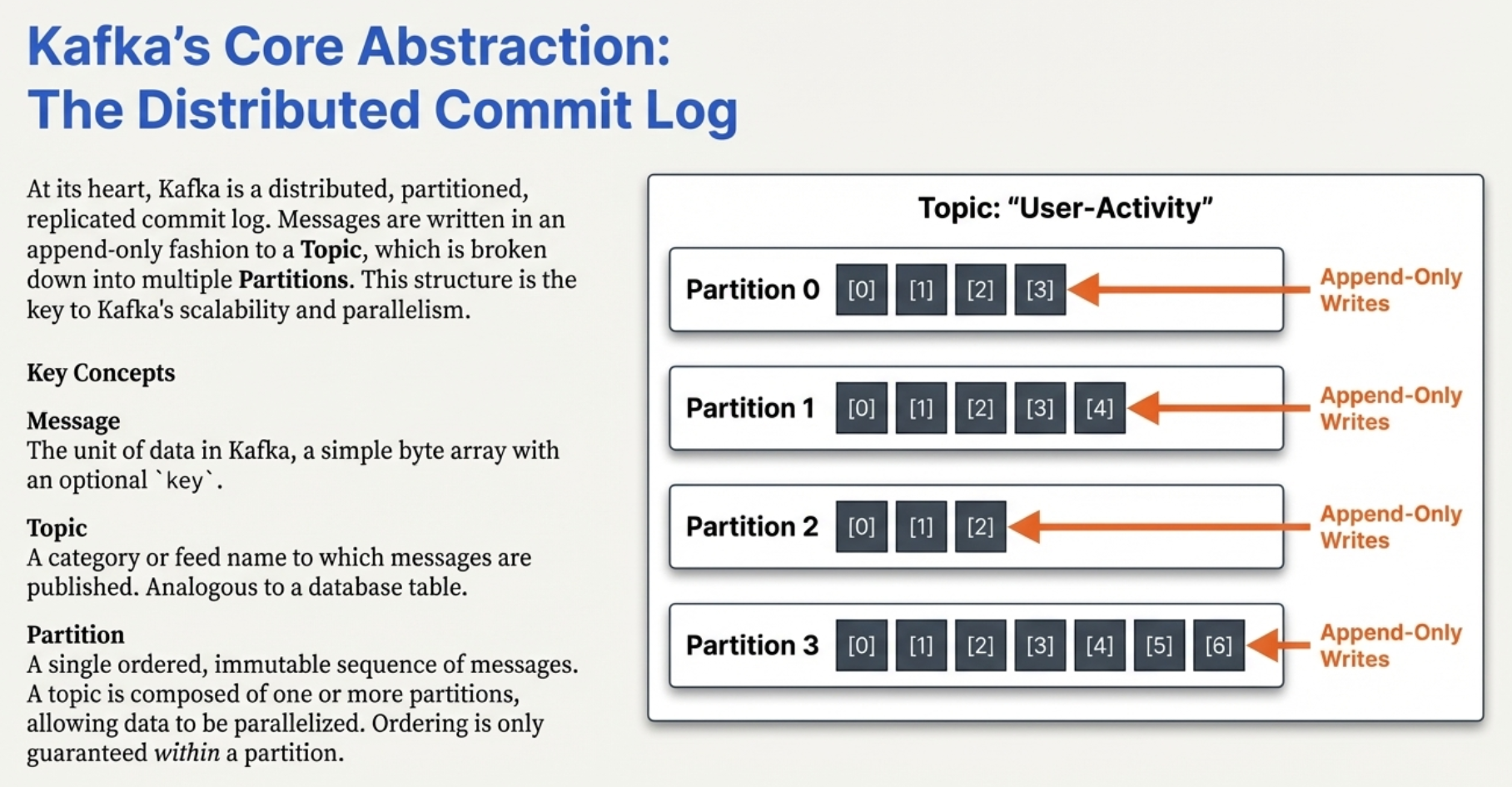 Visual showing a Topic "User-Activity" split into 4 partitions (Partition 0, 1, 2, 3), each with sequential message offsets and append-only writes.
1. Topics
A topic is a category or feed name to which events are published. Like channels, folders, or feeds.
graph TB
    subgraph "Kafka Cluster"
        T1[Topic: orders]
        T2[Topic: payments]
        T3[Topic: user-activity]
        T4[Topic: inventory]
    end

    P1[Order Service] --> T1
    P2[Payment Service] --> T2
    P3[Web App] --> T3
    P4[Warehouse Service] --> T4

    T1 --> C1[Email Service]
    T1 --> C2[Analytics]
    T2 --> C3[Accounting]
    T3 --> C4[Recommendations]

    style T1 fill:#74b9ff
    style T2 fill:#a29bfe
    style T3 fill:#fd79a8
    style T4 fill:#fdcb6e
Examples of topic names:
orders- All order-related eventsuser-registrations- User signup eventspayment-transactions- Payment eventssensor-readings- IoT sensor dataapplication-logs- Log aggregation
2. Partitions
Each topic is divided into partitions for parallelism and scalability.
graph TB
    subgraph "Topic: orders (3 partitions)"
        P0["Partition 0<br/>Offset 0: {orderId: ORD-1}<br/>Offset 1: {orderId: ORD-4}<br/>Offset 2: {orderId: ORD-7}<br/>..."]

        P1["Partition 1<br/>Offset 0: {orderId: ORD-2}<br/>Offset 1: {orderId: ORD-5}<br/>Offset 2: {orderId: ORD-8}<br/>..."]

        P2["Partition 2<br/>Offset 0: {orderId: ORD-3}<br/>Offset 1: {orderId: ORD-6}<br/>Offset 2: {orderId: ORD-9}<br/>..."]
    end

    A[Producer] -->|Key-based routing| P0
    A -->|Key-based routing| P1
    A -->|Key-based routing| P2

    style P0 fill:#74b9ff
    style P1 fill:#a29bfe
    style P2 fill:#fd79a8
Why partitions?
- Scalability - Different partitions can be on different brokers
- Parallelism - Multiple consumers can read different partitions simultaneously
- Ordering - Messages within a partition are strictly ordered
Key insight: Kafka guarantees ordering within a partition, but NOT across partitions.
// Example: Partition assignment

// Producer sends with key
await producer.ProduceAsync("orders", new Message<string, string>
{
    Key = "customer-123",  // Same key → same partition
    Value = JsonSerializer.Serialize(orderEvent)
});

// Messages with the same key always go to the same partition
// This ensures ordering for that customer's events

// Without key - round-robin distribution
await producer.ProduceAsync("orders", new Message<string, string>
{
    Value = JsonSerializer.Serialize(orderEvent)  // No key → distributed across partitions
});
3. Offsets
Each message in a partition gets a sequential ID called an offset.
graph LR
    subgraph "Partition 0"
        O0["Offset 0<br/>{order: ORD-1}"]
        O1["Offset 1<br/>{order: ORD-2}"]
        O2["Offset 2<br/>{order: ORD-3}"]
        O3["Offset 3<br/>{order: ORD-4}"]
        O4["Offset 4<br/>{order: ORD-5}"]
        O5["..."]

        O0 --> O1 --> O2 --> O3 --> O4 --> O5
    end

    C[Consumer A<br/>Current Offset: 2]
    C -.->|Reading| O2

    C2[Consumer B<br/>Current Offset: 4]
    C2 -.->|Reading| O4

    Note[Each consumer tracks its own offset<br/>Enables independent consumption & replay]

    style O2 fill:#00b894
    style O4 fill:#00b894
Offsets enable:
- Independent consumption - Each consumer group tracks its own position
- Replay - Reset offset to reprocess old messages
- Resume - Consumer crashes? Resume from last committed offset
- Monitoring - Track consumer lag (current offset vs. latest offset)
4. Brokers
A broker is a Kafka server. A production Kafka cluster typically has 3+ brokers for fault tolerance.
graph TB
    subgraph "Kafka Cluster"
        B1[Broker 1<br/>Port: 9092]
        B2[Broker 2<br/>Port: 9093]
        B3[Broker 3<br/>Port: 9094]

        B1 -.->|Replication| B2
        B2 -.->|Replication| B3
        B3 -.->|Replication| B1
    end

    P[Producers] --> B1
    P --> B2
    P --> B3

    C[Consumers] --> B1
    C --> B2
    C --> B3

    Z[ZooKeeper/KRaft<br/>Coordination]

    B1 -.-> Z
    B2 -.-> Z
    B3 -.-> Z

    style B1 fill:#74b9ff
    style B2 fill:#a29bfe
    style B3 fill:#fd79a8
Broker responsibilities:
- Store partition data on disk
- Serve produce requests from producers
- Serve fetch requests from consumers
- Participate in replication
- Manage partition leadership
5. Replication
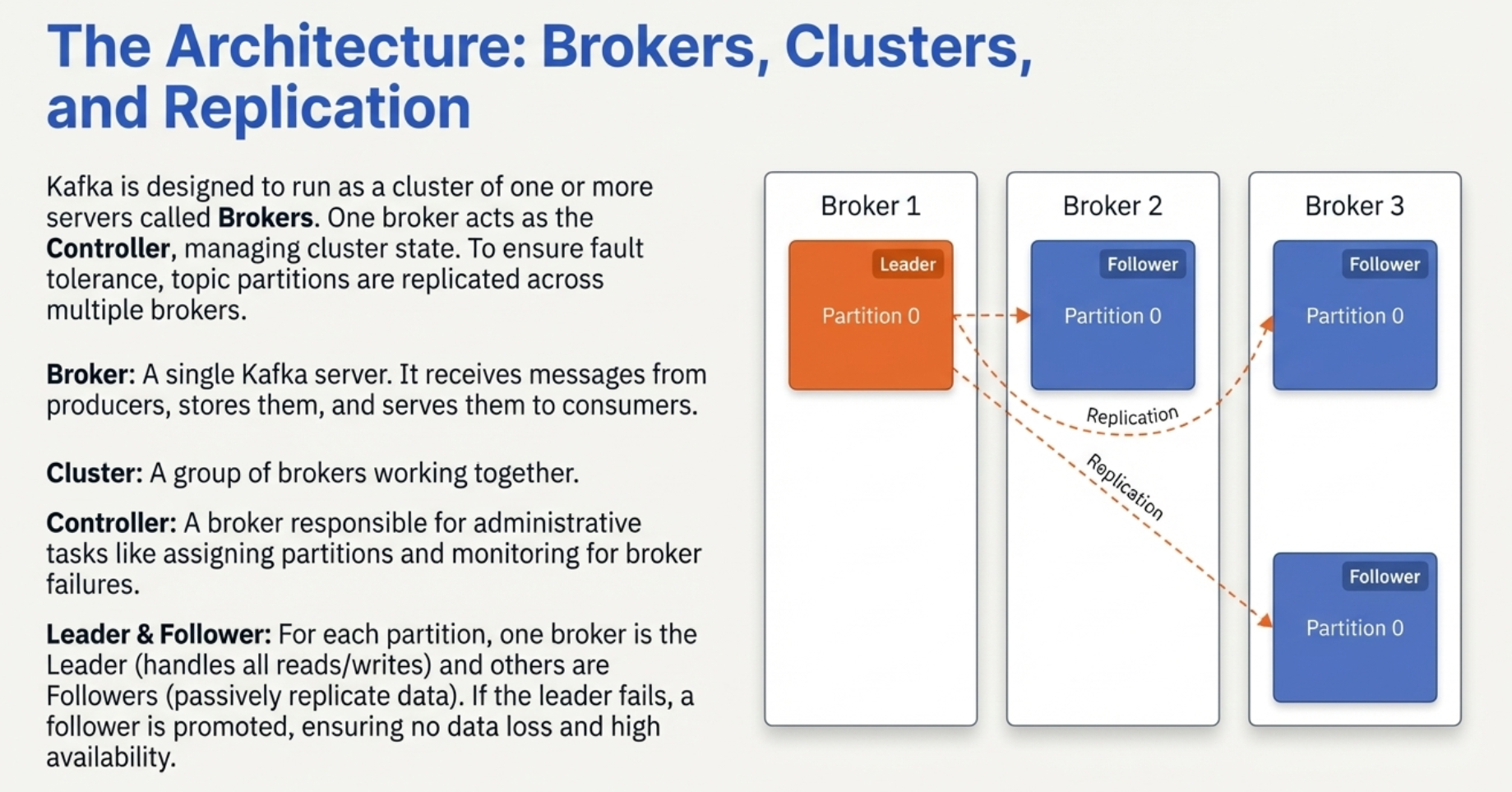 Three brokers shown: Broker 1 (Leader), Broker 2 (Follower), Broker 3 (Follower), with Partition 0 replicated across all three brokers.
Partitions are replicated across brokers for fault tolerance.
graph TB
    subgraph "Topic: orders, Partition 0<br/>Replication Factor: 3"
        L[Leader<br/>Broker 1]
        R1[Replica<br/>Broker 2]
        R2[Replica<br/>Broker 3]

        L -.->|Syncs| R1
        L -.->|Syncs| R2
    end

    P[Producers] -->|Write| L
    C[Consumers] -->|Read| L

    X[❌ Broker 1 Fails]
    X -.->|Failover| R1
    R1 -->|Becomes New Leader| NL[New Leader<br/>Broker 2]

    style L fill:#00b894
    style R1 fill:#fdcb6e
    style R2 fill:#fdcb6e
    style NL fill:#00b894
    style X fill:#ff7675
Replication concepts:
- Replication Factor - How many copies of each partition (typically 3)
- Leader - One replica handles all reads/writes
- Followers (ISR) - In-Sync Replicas that stay up-to-date
- Failover - If leader fails, a follower becomes the new leader
# Create topic with replication
kafka-topics --create \
  --bootstrap-server localhost:9092 \
  --topic orders \
  --partitions 3 \
  --replication-factor 3

# Topic: orders
# Partition 0: Leader=Broker1, Replicas=[Broker1, Broker2, Broker3]
# Partition 1: Leader=Broker2, Replicas=[Broker2, Broker3, Broker1]
# Partition 2: Leader=Broker3, Replicas=[Broker3, Broker1, Broker2]
6. Producers
Applications that publish events to Kafka topics.
sequenceDiagram
    participant Producer
    participant Broker1 (Leader)
    participant Broker2 (Replica)
    participant Broker3 (Replica)

    Producer->>Producer: Create message
    Producer->>Broker1 (Leader): Send message (acks=all)
    Broker1 (Leader)->>Broker1 (Leader): Write to local log

    par Replication
        Broker1 (Leader)->>Broker2 (Replica): Replicate
        Broker2 (Replica)->>Broker2 (Replica): Write to log
        Broker2 (Replica)-->>Broker1 (Leader): ACK
    and
        Broker1 (Leader)->>Broker3 (Replica): Replicate
        Broker3 (Replica)->>Broker3 (Replica): Write to log
        Broker3 (Replica)-->>Broker1 (Leader): ACK
    end

    Broker1 (Leader)-->>Producer: Success (all replicas confirmed)

    Note over Producer,Broker3 (Replica): With acks=all, message is safe<br/>even if broker fails
Producer configuration:
using Confluent.Kafka;

var config = new ProducerConfig
{
    // Broker addresses
    BootstrapServers = "localhost:9092,localhost:9093,localhost:9094",

    // Reliability
    Acks = Acks.All,  // Wait for all replicas (most reliable)
    Retries = 3,   // Retry on failure
    MaxInFlight = 5,

    // Performance
    BatchSize = 16384,  // Batch messages for efficiency
    LingerMs = 10,      // Wait up to 10ms to batch messages
    CompressionType = CompressionType.Snappy,  // Compress for network efficiency

    // Idempotence (exactly-once)
    EnableIdempotence = true
};

var producer = new ProducerBuilder<string, string>(config).Build();

// Send a message
var deliveryResult = await producer.ProduceAsync("orders", new Message<string, string>
{
    Key = "customer-123",  // Ensures ordering for this customer
    Value = JsonSerializer.Serialize(new
    {
        eventType = "OrderPlaced",
        orderId = "ORD-789",
        amount = 99.99
    })
});

// Wait for confirmation
Console.WriteLine($"Message sent to partition {deliveryResult.Partition} at offset {deliveryResult.Offset}");
Kafka's architecture defines clear roles for how data flows through the system.
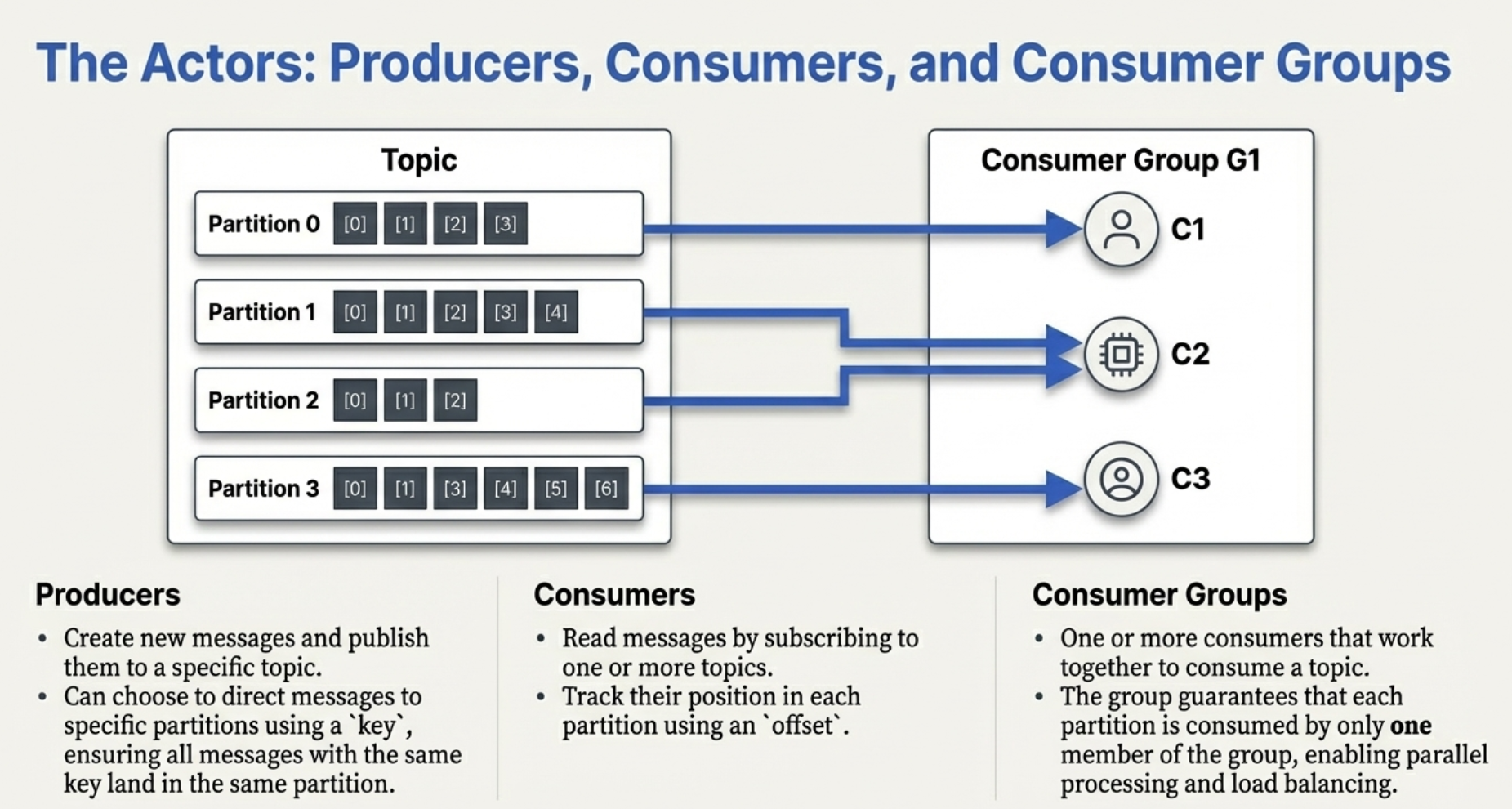 Diagram showing a Topic with 4 partitions, and Consumer Group G1 with three consumers (C1, C2, C3) each reading from different partitions in parallel.
7. Consumers and Consumer Groups
Consumers read events from topics. Consumer groups enable parallel processing while maintaining ordering.
graph TB
    subgraph "Topic: orders (3 partitions)"
        P0[Partition 0]
        P1[Partition 1]
        P2[Partition 2]
    end

    subgraph "Consumer Group: email-service"
        C1[Consumer 1] -->|Reads| P0
        C2[Consumer 2] -->|Reads| P1
        C3[Consumer 3] -->|Reads| P2
    end

    subgraph "Consumer Group: analytics-service"
        C4[Consumer A] -->|Reads| P0
        C4 -->|Reads| P1
        C4 -->|Reads| P2
    end

    subgraph "Consumer Group: warehouse-service"
        C5[Consumer X] -->|Reads| P0
        C5 -->|Reads| P1
        C6[Consumer Y] -->|Reads| P2
    end

    Note[Each consumer group independently<br/>tracks its own offsets]

    style C1 fill:#74b9ff
    style C2 fill:#74b9ff
    style C3 fill:#74b9ff
    style C4 fill:#a29bfe
    style C5 fill:#fd79a8
    style C6 fill:#fd79a8
Key principles:
- Each partition is consumed by only ONE consumer in a group
- Multiple consumer groups can consume the same topic
- Adding consumers (up to # of partitions) increases parallelism
- Each group tracks its own offsets independently
using Confluent.Kafka;

// Consumer in a group
var config = new ConsumerConfig
{
    // Consumer group
    GroupId = "email-service",  // Multiple consumers with same GroupId work together

    // Broker addresses
    BootstrapServers = "localhost:9092",

    // Offset management
    AutoOffsetReset = AutoOffsetReset.Earliest,  // Start from beginning if no offset stored
    EnableAutoCommit = true,       // Auto-commit offsets
    AutoCommitIntervalMs = 5000,  // Commit every 5 seconds

    // Consumer behavior
    MaxPollRecords = 500,  // Fetch up to 500 records per poll
    SessionTimeoutMs = 10000  // 10 second timeout before rebalance
};

var consumer = new ConsumerBuilder<string, string>(config).Build();
consumer.Subscribe("orders");  // Topic to consume

Console.WriteLine("Consumer started. Waiting for messages...");

while (!cancellationToken.IsCancellationRequested)
{
    var consumeResult = consumer.Consume(cancellationToken);
    var eventData = JsonSerializer.Deserialize<Dictionary<string, object>>(consumeResult.Message.Value);

    Console.WriteLine("Received message:");
    Console.WriteLine($"  Partition: {consumeResult.Partition}");
    Console.WriteLine($"  Offset: {consumeResult.Offset}");
    Console.WriteLine($"  Key: {consumeResult.Message.Key}");
    Console.WriteLine($"  Event Type: {eventData["eventType"]}");

    // Process the event
    await ProcessEventAsync(eventData);

    // Offset is auto-committed
}
Consumer Group Scaling Example
graph TB
    subgraph "Scenario 1: 3 Partitions, 3 Consumers"
        P1A[Partition 0] --> C1A[Consumer 1]
        P1B[Partition 1] --> C1B[Consumer 2]
        P1C[Partition 2] --> C1C[Consumer 3]

        Note1[Perfect parallelism<br/>Each consumer reads one partition]
    end

    subgraph "Scenario 2: 3 Partitions, 2 Consumers"
        P2A[Partition 0] --> C2A[Consumer 1]
        P2B[Partition 1] --> C2A
        P2C[Partition 2] --> C2B[Consumer 2]

        Note2[Consumer 1 handles 2 partitions<br/>Still maintains ordering per partition]
    end

    subgraph "Scenario 3: 3 Partitions, 5 Consumers"
        P3A[Partition 0] --> C3A[Consumer 1]
        P3B[Partition 1] --> C3B[Consumer 2]
        P3C[Partition 2] --> C3C[Consumer 3]
        C3D[Consumer 4<br/>❌ Idle]
        C3E[Consumer 5<br/>❌ Idle]

        Note3[Extra consumers are idle<br/>No more partitions to assign]
    end

    style C3D fill:#ff7675
    style C3E fill:#ff7675
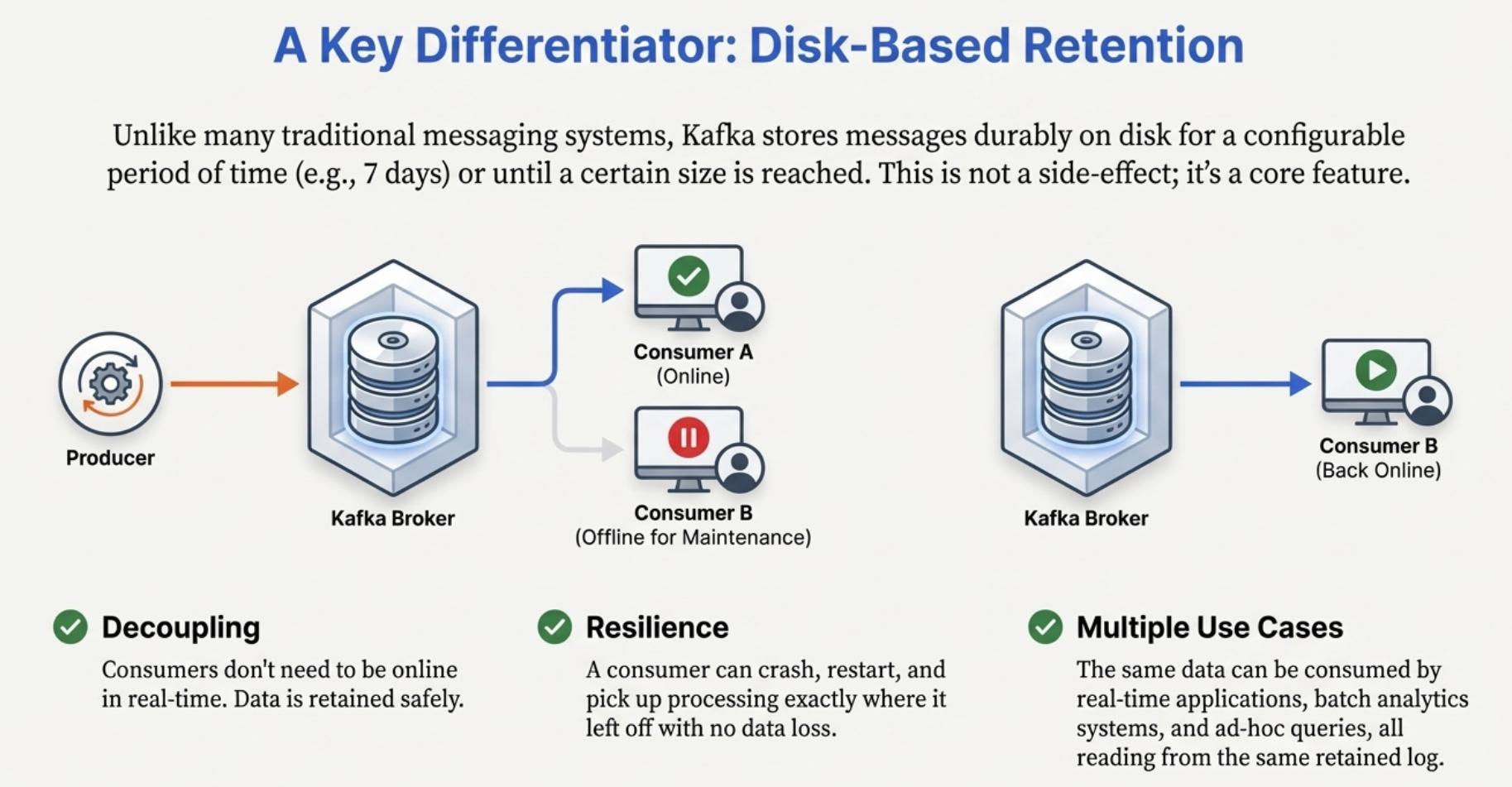 Flow diagram: Producer → Kafka Broker (disk storage) → Consumer A (online) and Consumer B (offline for maintenance). Later, Consumer B comes back online and can resume from where it left off.
How Kafka Achieves High Performance
1. Sequential I/O
graph LR
    subgraph "Random Disk Access (Slow)"
        A1[Write 1] -.->|Seek| D1[Disk location 1]
        A2[Write 2] -.->|Seek| D2[Disk location 2]
        A3[Write 3] -.->|Seek| D3[Disk location 3]

        Note1[Disk head moves<br/>Slow: ~100 writes/sec]
    end

    subgraph "Sequential Disk Access (Fast)"
        B1[Write 1] --> L1[Log position 1]
        B2[Write 2] --> L2[Log position 2]
        B3[Write 3] --> L3[Log position 3]
        L1 --> L2 --> L3

        Note2[Append only<br/>Fast: ~100,000+ writes/sec]
    end

    style A1 fill:#ff7675
    style B1 fill:#00b894
Kafka writes to disk sequentially (appending to a log). Sequential writes are incredibly fast—often faster than random memory access!
2. Zero-Copy
sequenceDiagram
    participant Disk
    participant OS
    participant Kafka
    participant Network

    Note over Disk,Network: Traditional: 4 copies
    Disk->>OS: Read to OS buffer
    OS->>Kafka: Copy to application
    Kafka->>OS: Copy to network buffer
    OS->>Network: Send

    Note over Disk,Network: Zero-Copy: 2 copies
    Disk->>OS: Read to OS buffer
    OS->>Network: DMA transfer (no CPU)

    Note over Disk,Network: Kafka uses sendfile() syscall
Kafka uses OS-level zero-copy to transfer data from disk to network without going through application memory. Huge performance win!
3. Batching
graph LR
    subgraph "Without Batching"
        A1[Message 1] -->|Network call| B1[Broker]
        A2[Message 2] -->|Network call| B1
        A3[Message 3] -->|Network call| B1

        Note1[3 network calls<br/>High overhead]
    end

    subgraph "With Batching"
        C1[Messages 1-100] -->|Single network call| D1[Broker]

        Note2[1 network call<br/>Low overhead<br/>Higher throughput]
    end

    style A1 fill:#ff7675
    style C1 fill:#00b894
Producers and consumers batch messages, reducing network overhead dramatically.
4. Compression
// Producer with compression
var config = new ProducerConfig
{
    CompressionType = CompressionType.Snappy,  // or CompressionType.Gzip, Lz4, Zstd
    BootstrapServers = "localhost:9092"
};

var producer = new ProducerBuilder<string, string>(config).Build();

// Compression reduces:
// - Network bandwidth (smaller messages)
// - Disk space (stored compressed)
// - Network latency (fewer bytes to transfer)

// Compression ratio example:
// Original: 1000 bytes
// Snappy:    400 bytes (60% compression)
// Gzip:      300 bytes (70% compression, slower)
5. Page Cache
graph TB
    subgraph "Kafka leverages OS Page Cache"
        P[Producer] -->|Write| PC[Page Cache<br/>in RAM]
        PC -->|Async flush| D[Disk]
        PC -->|Read| C[Consumer]

        Note1[Consumers often read from RAM<br/>not disk - extremely fast!]
    end

    style PC fill:#00b894
Kafka relies heavily on the OS page cache. Recent messages are in RAM, making reads extremely fast.
Kafka's Guarantees
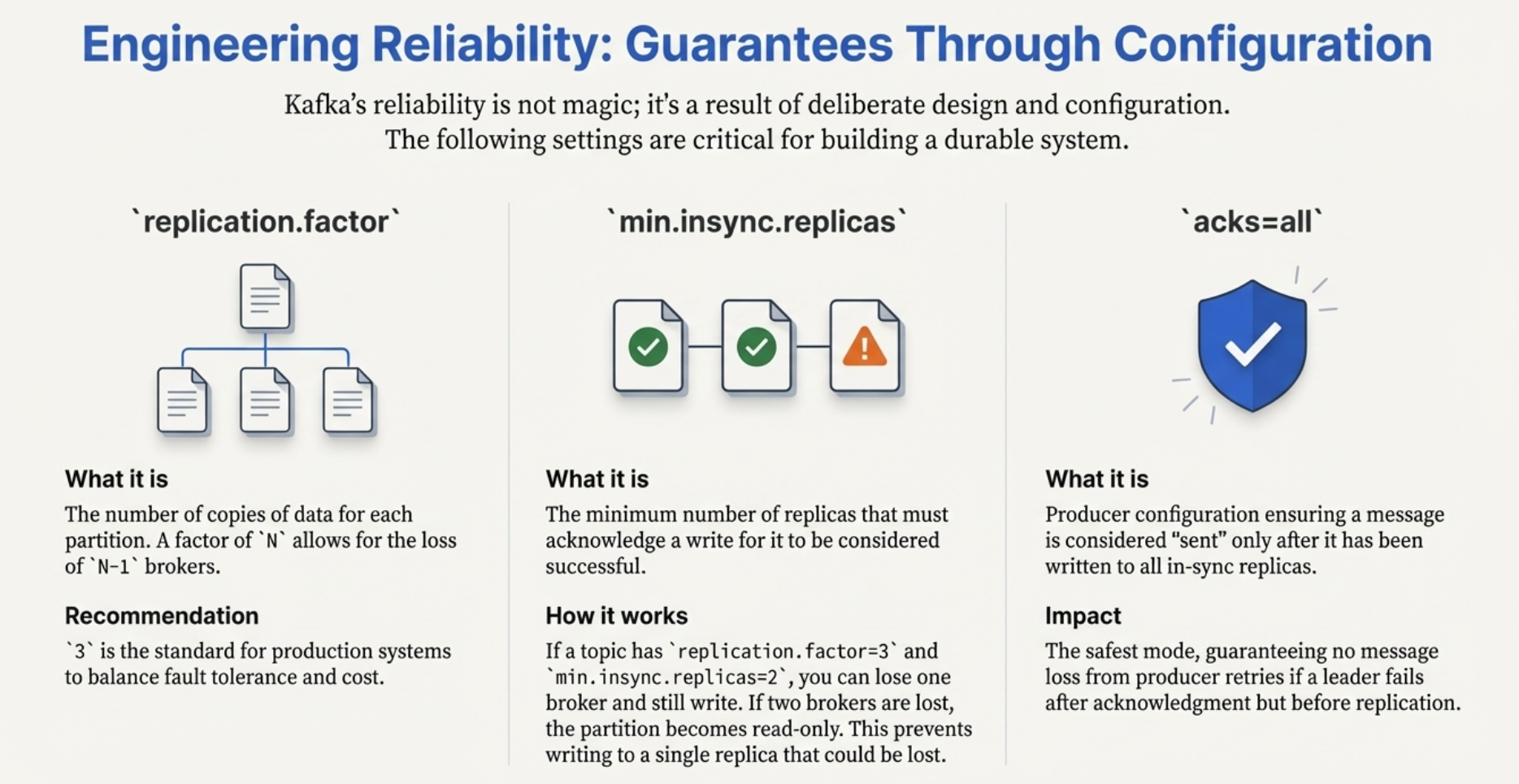 Three configuration panels showing: replication.factor (data copied N times), min.insync.replicas (minimum replicas that must acknowledge writes), and acks=all (producer waits for all in-sync replicas).
Message Delivery Semantics
graph TB
    subgraph "At-Most-Once"
        A1[Producer] -->|Fire and forget| B1[Broker]
        B1 -.->|May be lost| X1[❌]

        Note1[acks=0<br/>Fast but messages can be lost]
    end

    subgraph "At-Least-Once (Default)"
        A2[Producer] -->|Wait for ack| B2[Broker]
        B2 -->|ACK| A2
        A2 -.->|Retry on failure| B2

        Note2[acks=all, retries > 0<br/>Safe but may duplicate]
    end

    subgraph "Exactly-Once"
        A3[Producer] -->|Idempotent writes| B3[Broker]
        A3 -->|Transactional| B3

        Note3[enable_idempotence=True<br/>Guaranteed no duplicates]
    end

    style A1 fill:#ff7675
    style A2 fill:#fdcb6e
    style A3 fill:#00b894
At-Most-Once:
var config = new ProducerConfig
{
    Acks = Acks.None  // Don't wait for acknowledgment
};
var producer = new ProducerBuilder<string, string>(config).Build();
// Fast, but messages might be lost
At-Least-Once (Default):
var config = new ProducerConfig
{
    Acks = Acks.All,  // Wait for all replicas
    Retries = 3    // Retry on failure
};
var producer = new ProducerBuilder<string, string>(config).Build();
// Messages never lost, but might be delivered twice
Exactly-Once:
var config = new ProducerConfig
{
    EnableIdempotence = true,  // Prevents duplicates
    Acks = Acks.All,
    Retries = int.MaxValue
};
var producer = new ProducerBuilder<string, string>(config).Build();
// Messages delivered exactly once (most expensive)
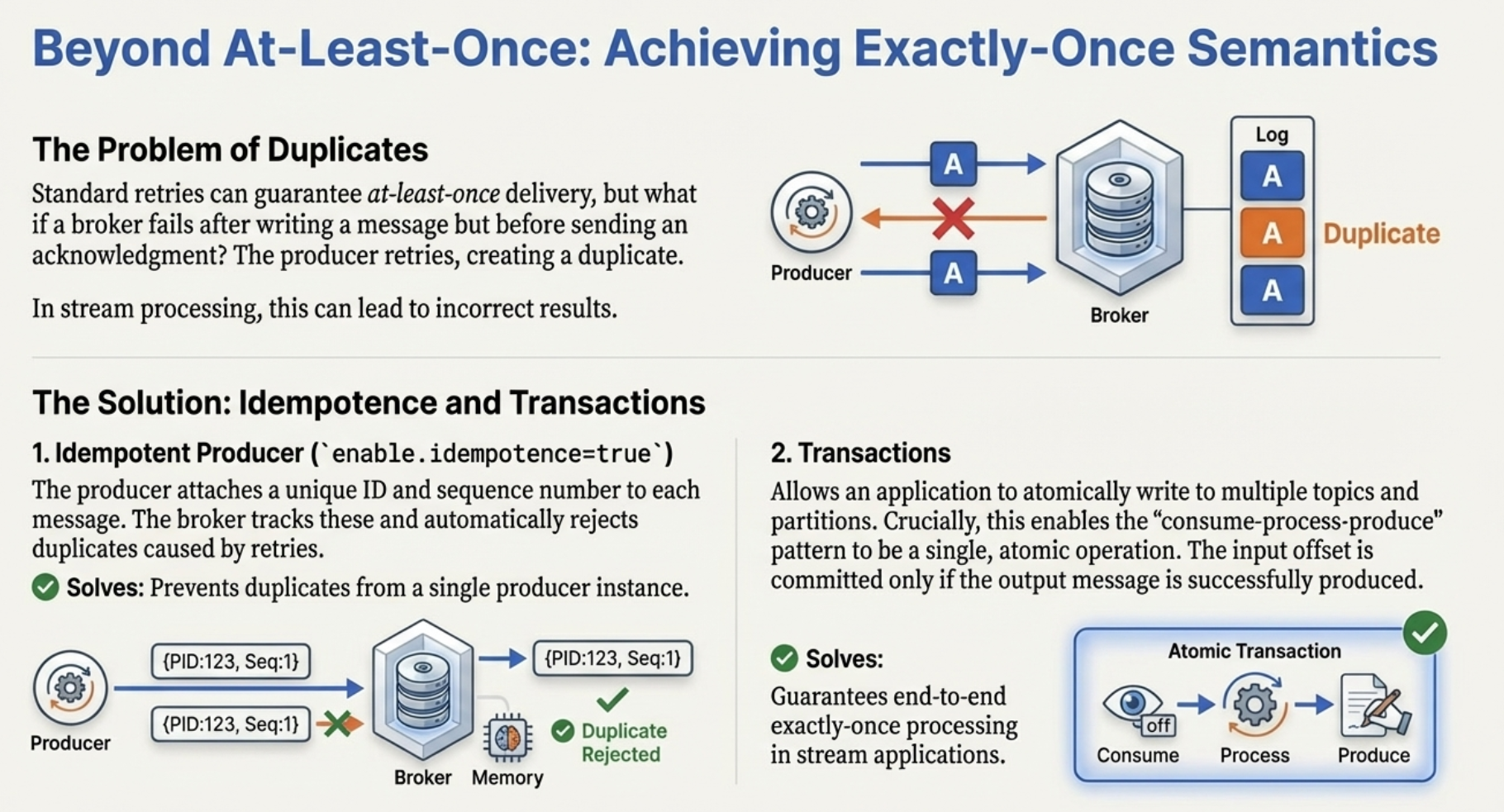 Two solutions shown: 1) Idempotent Producer with Producer ID and Sequence Number preventing duplicates, and 2) Transactions enabling atomic consume-process-produce operations.
Ordering Guarantees
graph LR
    subgraph "Within Partition: Ordered ✅"
        P1[Msg 1<br/>Key: customer-A] --> P2[Msg 2<br/>Key: customer-A]
        P2 --> P3[Msg 3<br/>Key: customer-A]

        Note1[Same partition<br/>Strict ordering]
    end

    subgraph "Across Partitions: Not Ordered ❌"
        PA[Partition 0<br/>Msg 1, 3, 5]
        PB[Partition 1<br/>Msg 2, 4]

        Note2[Different partitions<br/>No ordering guarantee]
    end

    style P1 fill:#00b894
    style PA fill:#ff7675
Key point: Use message keys to ensure related events go to the same partition and maintain ordering.
// Ensure ordering for specific customer
await producer.ProduceAsync("orders", new Message<string, string>
{
    Key = "customer-123",  // All events for customer-123 go to same partition
    Value = JsonSerializer.Serialize(orderEvent)
});
When to Use Kafka
Kafka has evolved from solving LinkedIn's data pipeline problem into a foundational technology for any organization that treats data as a continuously evolving and ever-growing stream.
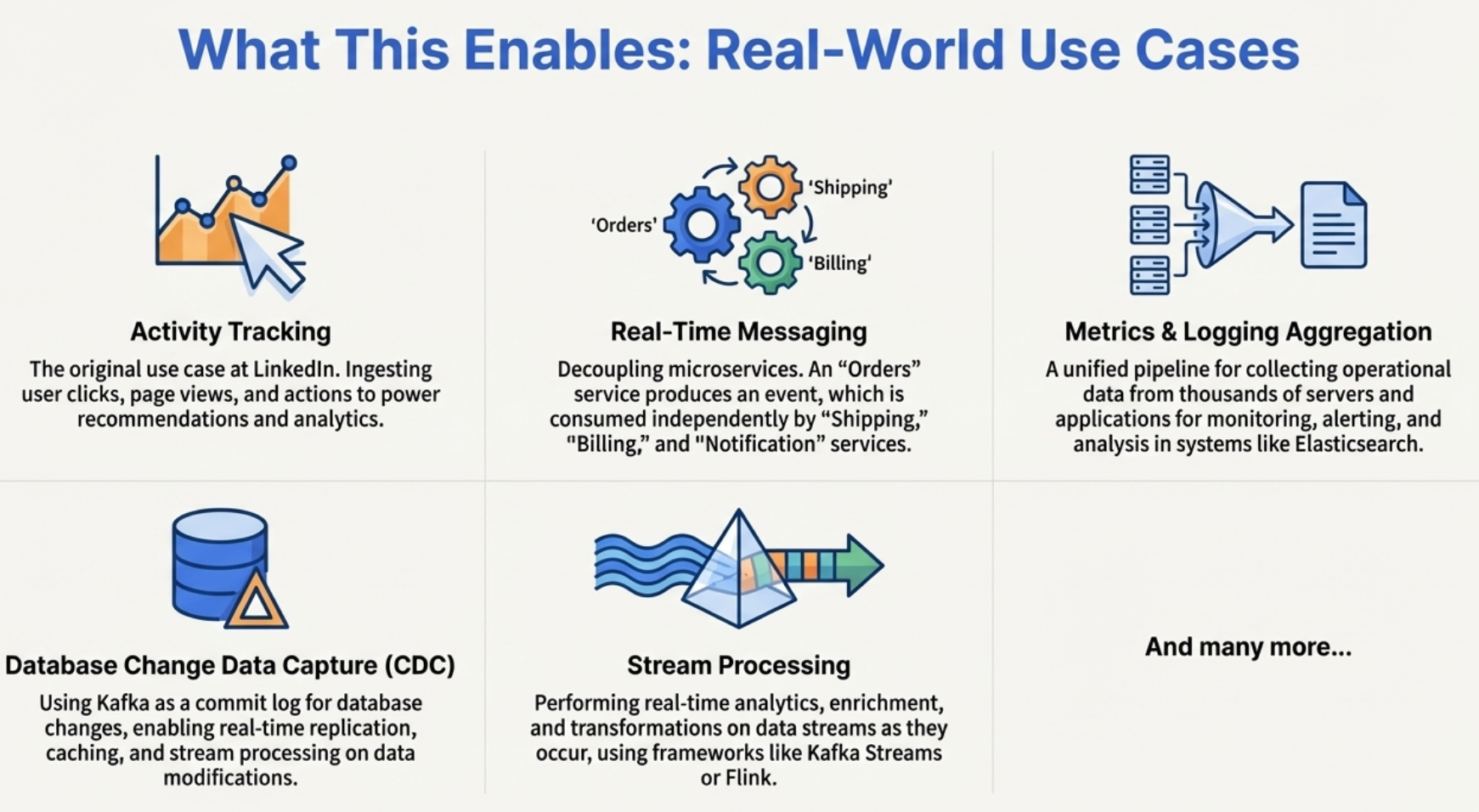 Six use case boxes showing: Activity Tracking, Real-Time Messaging, Metrics & Logging Aggregation, Database Change Data Capture (CDC), Stream Processing, and "And many more..."
✅ Perfect for Kafka:
-
High-throughput event streaming
- Processing millions of events per second
- Real-time data pipelines
-
Event sourcing architectures
- Storing events as source of truth
- Replaying events to rebuild state
-
Log aggregation
- Collecting logs from multiple services
- Centralizing for analysis
-
Metrics collection
- Real-time metrics from distributed systems
- Time-series data
-
Change Data Capture (CDC)
- Capturing database changes as events
- Streaming data to other systems
-
Microservices communication
- Decoupled, asynchronous communication
- Multiple services reacting to same events
❌ Not ideal for Kafka:
-
Simple request-response patterns
- Synchronous RPC better with REST/gRPC
-
Low-volume messaging (<1000 msgs/day)
- Kafka overhead not worth it
- Use SQS or simple database
-
Complex routing logic
- "Send message to service X if condition Y"
- Better with RabbitMQ exchanges
-
Small teams without distributed systems experience
- Operational complexity
- Learning curve
-
Transactional message processing
- Need guaranteed ordering across topics
- Traditional queues better
Kafka Ecosystem
graph TB
    K[Apache Kafka Core]

    K --> KS[Kafka Streams<br/>Stream processing library]
    K --> KC[Kafka Connect<br/>Data integration]
    K --> SR[Schema Registry<br/>Schema management]
    K --> KSQL[ksqlDB<br/>SQL for streams]

    KS --> APP1[Java/Scala Apps<br/>Real-time processing]
    KC --> DB[(Databases)]
    KC --> S3[Cloud Storage]
    KC --> ES[Elasticsearch]
    SR --> AVRO[Avro Schemas]
    SR --> PROTO[Protobuf]
    KSQL --> SQL[SQL Queries on Streams]

    style K fill:#00b894
    style KS fill:#74b9ff
    style KC fill:#a29bfe
    style SR fill:#fd79a8
    style KSQL fill:#fdcb6e
Kafka Streams
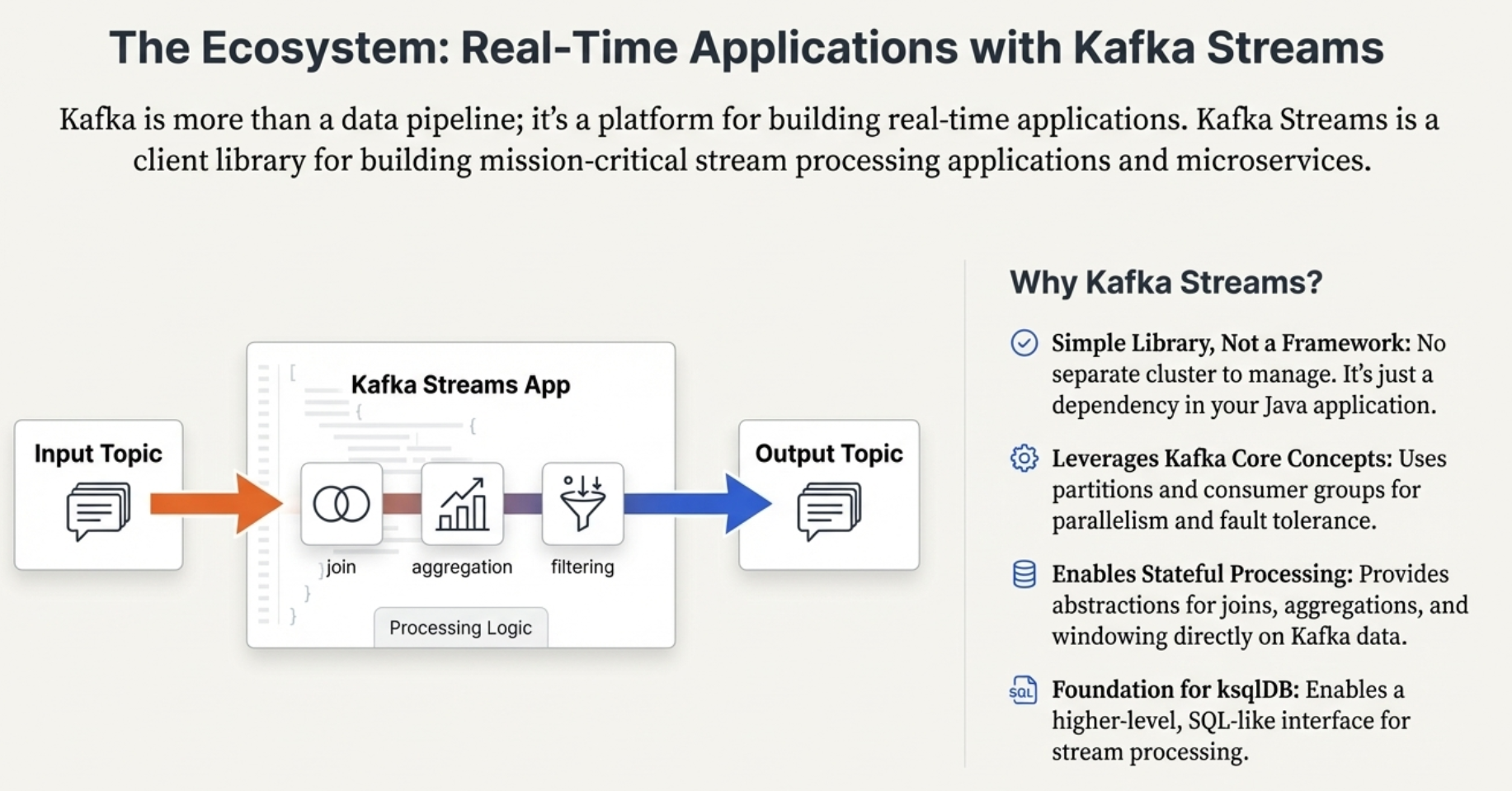 Kafka Streams App shown with Input Topic → processing logic (join, aggregation, filtering) → Output Topic.
// Stream processing directly on Kafka
var builder = new StreamsBuilder();
var orders = builder.Stream<string, Order>("orders");

// Transform stream
orders
    .Filter((key, order) => order.Amount > 1000)
    .MapValues(order => EnrichOrder(order))
    .To("high-value-orders");
Kafka Connect
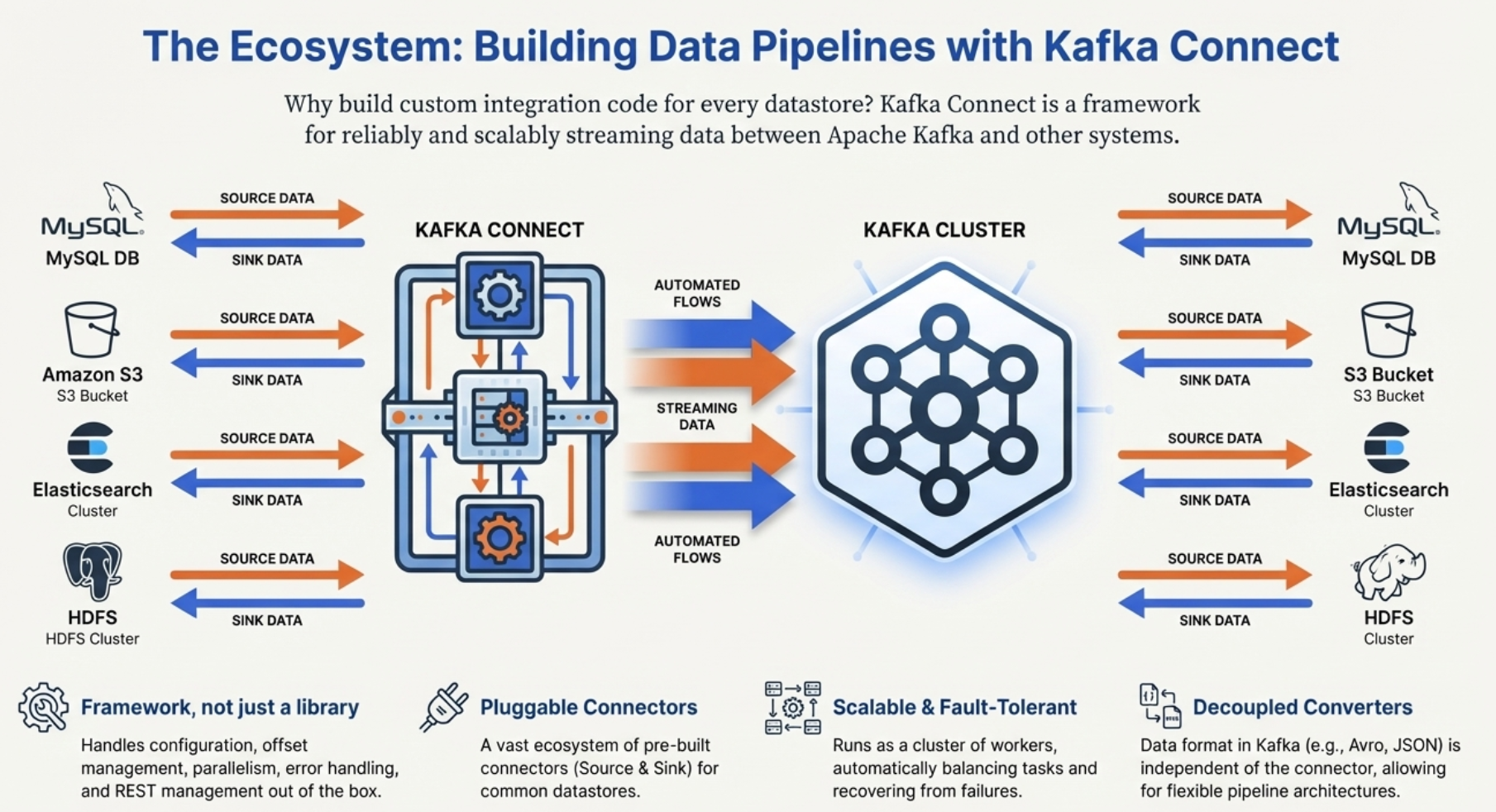 Diagram showing multiple data sources (MySQL, Amazon S3, Elasticsearch, HDFS) connecting to Kafka Connect, which streams data to/from a Kafka Cluster, with connections to corresponding sinks on the other side.
{
  "name": "postgres-source",
  "connector.class": "io.debezium.connector.postgresql.PostgresConnector",
  "database.hostname": "localhost",
  "database.port": "5432",
  "database.dbname": "mydb",
  "table.include.list": "public.orders"
}
Every database change becomes a Kafka event automatically!
Schema Registry
using Confluent.SchemaRegistry;
using Confluent.SchemaRegistry.Serdes;
using Confluent.Kafka;

// Schemas are versioned and validated
var schemaRegistryConfig = new SchemaRegistryConfig
{
    Url = "http://localhost:8081"
};
var schemaRegistry = new CachedSchemaRegistryClient(schemaRegistryConfig);

var producerConfig = new ProducerConfig
{
    BootstrapServers = "localhost:9092"
};

var producer = new ProducerBuilder<string, Order>(producerConfig)
    .SetValueSerializer(new AvroSerializer<Order>(schemaRegistry))
    .Build();
Kafka Architecture Deep Dive
graph TB
    subgraph "Kafka Cluster"
        ZK[ZooKeeper/KRaft<br/>Cluster coordination<br/>Leader election]

        B1[Broker 1<br/>Controller]
        B2[Broker 2]
        B3[Broker 3]

        B1 -.->|Metadata sync| ZK
        B2 -.->|Metadata sync| ZK
        B3 -.->|Metadata sync| ZK
    end

    subgraph "Storage"
        S1[Disk<br/>Partition 0 segments]
        S2[Disk<br/>Partition 1 segments]
        S3[Disk<br/>Partition 2 segments]
    end

    B1 --> S1
    B2 --> S2
    B3 --> S3

    P[Producers] --> B1
    P --> B2
    P --> B3

    C[Consumers] --> B1
    C --> B2
    C --> B3

    style ZK fill:#95e1d3
    style B1 fill:#74b9ff
Log Segments
graph LR
    subgraph "Partition 0 on Disk"
        S1["Segment 0<br/>Offsets 0-999<br/>Old, compressed"]
        S2["Segment 1<br/>Offsets 1000-1999<br/>Older"]
        S3["Segment 2<br/>Offsets 2000-2999<br/>Recent"]
        S4["Active Segment<br/>Offsets 3000-3456<br/>Currently writing"]

        S1 --> S2 --> S3 --> S4
    end

    DEL[Old segments deleted<br/>based on retention policy]
    S1 -.->|After retention period| DEL

    style S4 fill:#00b894
    style S1 fill:#ff7675
Messages are stored in log segments:
- Active segment receives new writes
- Closed segments are immutable
- Old segments deleted per retention policy
Performance Characteristics
graph TB
    subgraph "Kafka Performance"
        T1[Throughput<br/>Millions msgs/sec]
        T2[Latency<br/>2-3ms p99]
        T3[Scalability<br/>Horizontal]
        T4[Durability<br/>Replicated storage]
    end

    Note[Real-world benchmarks:<br/>2M msgs/sec on 3 brokers<br/>Sub-millisecond latency<br/>99.9% durability]

    style T1 fill:#00b894
    style T2 fill:#00b894
    style T3 fill:#00b894
    style T4 fill:#00b894
Real-world numbers:
- Throughput: 2M+ messages/second per cluster
- Latency: <10ms end-to-end at p99
- Storage: Petabytes of data
- Retention: Days to years
- Consumers: Thousands per cluster
Getting Started Checklist
Before diving into hands-on (Part 4), understand:
✅ Topics - Categories for events
✅ Partitions - Scaling and ordering
✅ Offsets - Position in partition
✅ Brokers - Kafka servers
✅ Replication - Fault tolerance
✅ Producers - Write events
✅ Consumers - Read events
✅ Consumer Groups - Parallel processing
Next Steps
In Part 4, we'll get hands-on:
- Setting up Kafka locally (Docker)
- Creating topics and partitions
- Writing a producer to send events
- Writing consumers to process events
- Building a complete event-driven application
- Understanding consumer groups in action
You now understand what Kafka is and why it's powerful. Time to write some code! 🚀
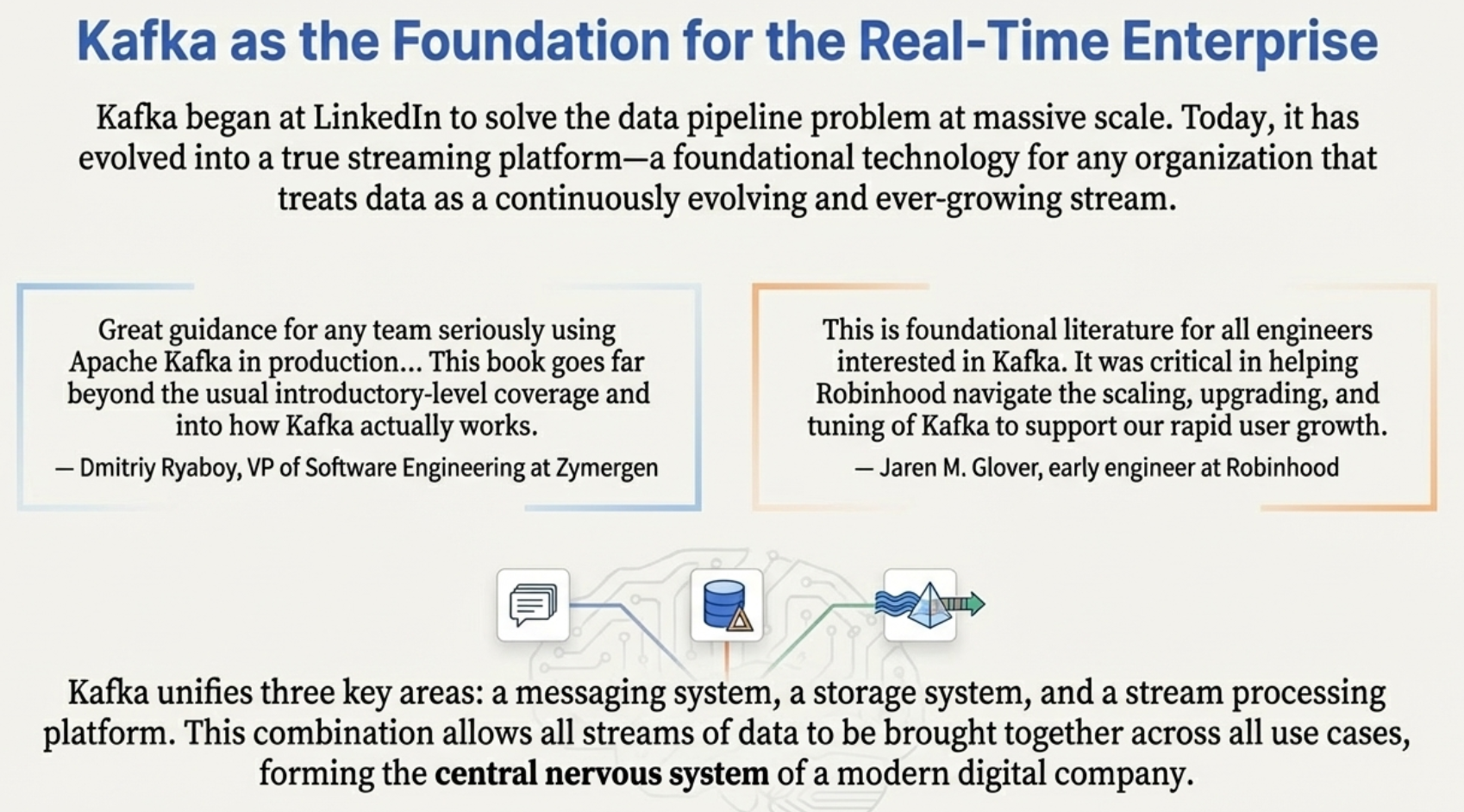 Quotes from Zymergen and Robinhood engineers praising Kafka's comprehensive coverage and critical role in scaling their systems. Bottom shows three icons representing Kafka's unification of: messaging system, storage system, and stream processing platform, forming the central nervous system of a modern digital company.
Key Takeaways:
- Kafka is a distributed, fault-tolerant event log
- Topics have partitions for scalability
- Partitions provide ordering guarantees
- Consumer groups enable parallel processing
- Replication ensures fault tolerance
- High performance through sequential I/O, zero-copy, and batching
- Perfect for high-throughput event streaming
Next: Let's build something with Kafka part-04!
Questions about this post?
Send a message and I'll get back to you.